Lately I’ve been on a tear with audiobooks, managing to cram a number of books in between my regular music and podcast listening. The sudden upswing in interest has prompted me to renew my investigation of the problems the 5G (fifth generation) model iPod has with long-playing books. As I noted last summer, the 5G has troubles with homemade m4b files (bookmarkable AAC) longer than a certain play time.
The iPod will suddenly stop playing an audiobook within a few minutes and return to the main menu. This happens when resuming a book, after having listened to something else or resyncing the device, basically anything that stops rather than pauses the book. When selecting the book again, the iPod starts from the beginning, having lost the bookmark and updating the play count/date as though it had properly finished playing.
Since I knew I would be delving into book territory, I decided to figure out the optimum way of working around the iPod’s inexplicable limitation. And really, for all my experimentation, the only concrete result I’ve been able to find is: 4 hours. 4 hours is about the maximum running time of any homemade m4b audiobook file before the iPod starts wigging out about it. It didn’t matter what I used for my encoding settings, my sample rates, or bit rates or channels or workflow or program. No combination of settings allowed the iPod to play longer than 4 hours without a hiccup, always stopping in the middle of the same phrase.
I even tried this little ingenious trick:
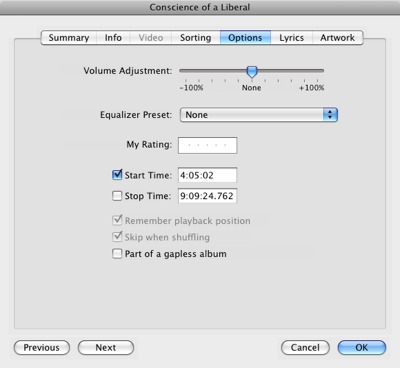
I manually set the audiobook’s options in iTunes so that the start time was at the 4 hour mark, hoping to persuade my iPod to at least go for another 4 hours. No dice.
I can say however that the sample rate seems to have the most effect on how long you can listen before the iPod won’t let you pick up where you left off. 22 kHz seems to be the trick. Whether your book is stereo or mono seems to matter little, giving about the same performance. Same for bitrate. However, higher sampling rates seems to reduce the amount of time before you lose the bookmark feature.
There probably are a handful more combinations and techniques I could try, but it takes quite a while to join, encode, test and evaluate each option. If anyone finds something with significantly different results, feel free to drop a line this way.

In the meantime, I’m glad Audiobook Builder can set a Maximum Part length and will split files so that nothing is longer than what I need them to be. It’s a groovy little workaround.
Ive had the same problem and its really getting on my nerves. Maybe suggesting a fix for this to Apple might help
Reply
O, and is that audiobook builder just for macs?
Reply
tunequest Reply:
April 18th, 2008 at 8:52 am
Unfortunately for Windows users, the two straight-forward methods I know for creating audiobooks are Mac only: the Audiobook Builder program and an Applescript called Join Together.
The process certainly is doable on Windows however. You have to splice your audio together, convert it to AAC/M4A and then just change to file extension to M4B before copying it to your iPod. But I don’t know of any Windows solutions that will do all that with “one click.”
Reply
There’s a nice little free windows program (MP3 to iPod Audio Book Converter ) that creates m4bs, joins mp3s, etc. in one click: http://www.freeipodsoftware.com/
I’m also having this problem with my 5.5G ipod. If anyone comes up with a solution, please post. Thanks!
Reply
I experienced this problem (rarely), but only with Audible files on my 5.5G iPod
With the new 160GB Classic I haven’t seen the problem at all. In fact I’ve been converting my 2 part books into 1 part books. It’s nice to not have as many files floating around.
Reply
I have this problem too off and on. I think it has something to do with the disk drive spin-up time timer that is programed into our 5th gen ipods. Some drives seem to go to sleep and not wake up or take a longer time to wake up. There is little quesiton in my mind it is drive related. I have found my 5.5 gen will often not load the audiobook at all when it is first being used. Sometimes I press the Audiobook menu and the list of books is blank ! I reboot my Ipod and they show back up on the menu. If I use the Ipod for awhile it seems to load them better and also after some use plays the files mostly but not always without problems. The file size limit of 4 hours is not something I have found as stated by other posters…although I have had random problems files of any size at times. I have found by searching the internet a file size limit of 13 hours…more on that below.. One trick I have used when trying to get my audiobook started is that I press play wait a second then quickly press pause then wait 5 seconds. After this I press Play again and most of the time it plays for some reason…I think disk drive related…it seems to read the first block from there out of the audiobook. If it does not do it’s first seek and misses starting the audiobook…it will reset where I am on the book and I like others have to refind my place. Gurr.
Talking about file sizes, the absolute file size that I have found is 13 hours or about 330mb for books convered to M4B files. If longer than 13 hours or 330mb I can count on problems. I found others that have hit this limit and there is some posting on the interent about this. Books longer than this must be split into 2 files for sure. Also…I make sure the files converted are set to MONO only for audiobooks and recorded at 48 to96 kbps max. This I have read helps with these problems and my experience of over a year agrees with this. YMMV of course.
I sent my 5.5 gen back to apple during warrentee but they “could not find a problem” and shipped it back with no hardware change at all. I am not happy with this, my first Ipod, as they don’t have the bugs worked out of it one bit and I am fairly certain they will no longer update this model with new software. I did take out an applecare and might proceed in getting the drive changed through apple as I can’t believe all 5.5gens have this same problem. I can live with the problems in my case but have to constantly reboot and play games to get this thing to play audiobooks correctly, esp when cold.
As you all know we seem to forgive Apple of these sins when we would never do the same for almost any other company…I don’t know really why they get away with it but the public is forgiving to this company and they really have the only show in town. The Ipod is so much better than anyone elses device that probably I will buy newer one even if I can’t get this one to work right. Now that is sick !!
Reply
This problem is finally solved in itunes 8. Rather than converting mp3s to m4b in order to make audiobooks, you can now tell itunes to treat regular mp3s like audiobooks.
It’s explained here on lifehacker: http://lifehacker.com/5064539/itunes-8-makes-it-easy-to-convert-any-file-to-an-audiobook
I’ve been using this for the last few weeks on my 5.5 gen and haven’t had any of my old audiobook restart problems. Hope this helps.
Reply
tunequest Reply:
November 3rd, 2008 at 9:45 pm
That’s some good news, stm. I haven’t upgraded yet to iTunes 8 so I hadn’t seen that. Do you know if older iPod’s respect the setting with regards to variable playback speeds?
Reply
stm Reply:
November 7th, 2008 at 2:14 pm
On my 5.5 variable playback speeds work fine with the new itunes 8 audiobook setting.
Reply
tunequest Reply:
November 9th, 2008 at 4:58 pm
Great! That’s good to know. Thank you.
Reply
I have a 30 gig Ipod video classic (3 years old?, approx) and it still does this with itunes 8…. it drives me NUTS! I might look into making the files smaller, but I’m seeing what else I can find first. If you’re still having this problem and have found a solution, please share! 🙂
Reply
Seems like 13 hours is the limit (with my one it was 13:!5, to be exact)
Busy rebuilding my audiobooks into two-parters 🙁
Reply
Hey, I started merging my audiobooks (ripped from my cd versions as many small .mp3 files) to .m4b with MP3 to iPod Audio Book Converter. An odd thing happened on some of them though: when I imported them into iTunes, even though the files are really only about 3hrs long, iTunes reports them to be anywhere from 10 to 778 hours long!
Anyone else run into this problem with this program? Anyone know a simple way to correct the lengths so they reflect the right duration?
Thanks and so glad I discovered this site! So many interesting discoveries!
Reply
Erica Wallin Reply:
March 4th, 2010 at 12:16 pm
Hi Brian. A few weeks ago i got this exact problem! I also cant forward or rewind these audiobooks. Only thing is that i can’t find anyone who has the solution, or rather, you are the first one I found that has had the same problem. I notice that you wrote this question about a yar ago, so have you found any answers? I cant understand why there isnt more people writing about it!
thx
Reply
hallo,
ich hoffe hier im Forum kann mir jemand helfen!
Ich habe versehentlich vier Daten von meinem MP3 Player verloren. Leider sind die Daten nicht mehr im meinem Papierkorb.
Die Files sind sehr wichtig für mich! Ich würde die gerne zurückbekommen.
Wer kennt ne Seite auf der ich Infos dazu finde, wie ich die Daten retten kann??
Vielen Dank schonmal für eure Antworten
danke
Reply
Update from my post of sept 28 2008
I stopped using my 5.5 G Ipod and bought an Ipod Touch 3Gen 32gb unit. I can report that all my previous audiobooks work perfectly now. I can also say that this new Ipod touch unit has no disk drive in it as it is solid state and has no weird stuff that randomly happens. The Ipod touch is superior in all ways to my old 5.5G Ipod with both audio books and music.
This confirms in my mind that Apple had/has problems with the old 5G Ipods in general and would never admit to it. I still think it is disk drive related but could not/can’t prove it. I am now very happy with the new Ipod Touch and can recommend to you all that suffer from the odd-ball things that are happening with your 5G units to just forget about trying to make it work with playing with file lengths etc. I also note that my kids 3G Nano’s run audiobooks without problems.
As an abundance of caution, I still observe the 13 hour or 330mb file limits however and have had zero problems since retiring my 5.5G Ipod.
I usually import most all of my audiobooks from CD’s as mp3 files using the “custom” import settings using the 128 kbps setting. I then make sure it is set to mono at a sample rate of 44.1 kHz. I click on the filter freqencies below 10 HZ. This yeilds a 64 kbps output files (mono) that sounds good to my ears.
I then use an MP3 combiner program to combine up to 10 CDs worth of MP3 files (about 150 files or tracks) into larger MP3 file(s). The resultant file is about 10 hours long and about 300 mb large. Many audiobooks will end up having 2 files only to listen to when I am finished. My wife enjoys having less “tracks” to deal with in keeping her place as the “remember position” is set on.
There are a lot of other valid variations to this process on the web. I use MP3 files mainly because combining the files is easier than if they were AAC files. AAC files however does sound a bit better per kbps and also some programs allow you now to treat the tracks as chapters when in AAC format…chapters allow you to have one large file with each track as a “chapter” within it. I don’t fine huge value to that feature but some do. My wife likes that feature in that it is a tad easier for her to keep her place because the fast forward button only skips ahead one chapter at a time if she presses it accidentally on her nano.
YMMV
Tom Johnson East Winthrop Maine
Reply
I’m having the same problem with my 60GB 4th gen ipod when playing m4b audiobooks. I’m also making a guess that it is related to the periodic drive spin up or buffering process. I’m waiting for the last component to arrive in the mail, at which point I will be converting the storage to 16GB solid state flash. Cost: $30. Not going to be goaded into buying a new ipod just to be able to play DRM.
Reply