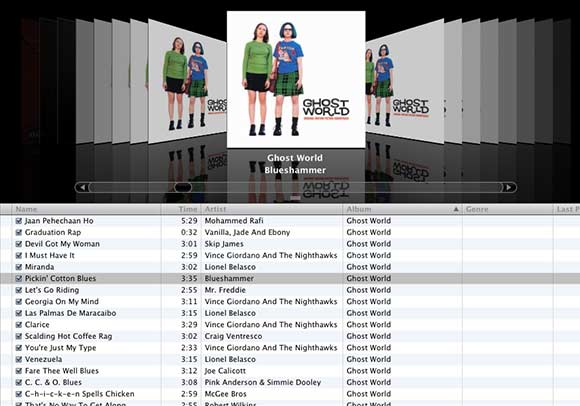
Dilemma: When using coverflow view in iTunes 7, your albums containing multiple artists (soundtracks, tribute albums, benefit albums, etc) show up with multiple, individual covers. One way to fix that is to set the Compilation tag check box for those albums. But what if, for whatever reason, you don’t want to set an album as a compilation? (They’re your reasons; I won’t question them. For instance, you may not want compilations shunted off into their own little corner of your library.)
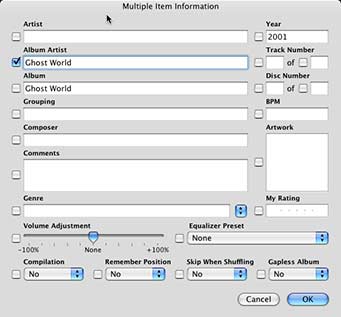
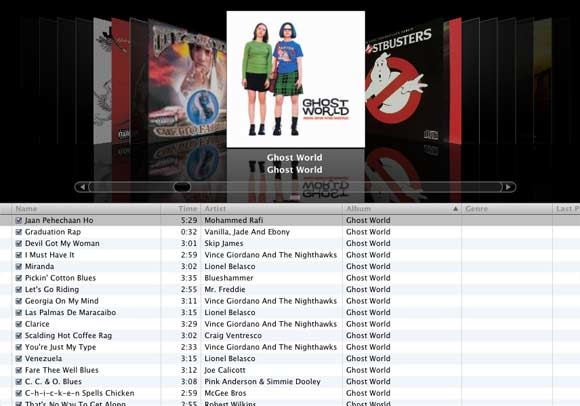
An alternate way to bring those multiple covers together provides a worthwhile use to the new and somewhat baffling Album Artist tag. Just put the album/compilation name in Album Artist field and watch as those album covers disappear and consolidate into one.
Ta Da!
that’s fine, but you still have problems if you want to have coverflow listed in alphabetical order by artist, it wont group them, and if you
sort by album artist, the tracks get out of order.
Reply
Yeah, for your second point, the tracks get out of order whether you use the Compilation check box or put the album name in the Album Artist. In either case, iTunes considers the Artist field to be the secondary sorting parameter and puts the list in alphabetical order that way.
As for your first point, isn’t that a little obvious? When you tell iTunes to sort by Artist, it makes sense that it would split the compilations. It’s certainly more logical that way than if a bunch of later-in-the-alphabet artists appearing near the top because they’re grouped on a compilation with another early-alphabet artist.
Reply
I noticed the same thing. To fix it, I used the new “Grouping” tag, and sort by grouping. Then it comes in order by track number.
Two disadvantages to this: first, it does not ignore “The”, so you will have to omit it from the grouping tag (unless you want “The Black Crowes” immediately beside “The Who”… which you probably don’t). Also, when you sort this way, you can’t use the keyboard to jump to an artist. Instead, using the keyboard jumps to a random song that starts with the letter you typed.
Reply
tunequest Reply:
March 18th, 2007 at 9:48 am
I haven’t actually found a use for Coverflow beyond the “geewhiz” factor, so I’m not all that familiar with its intricacies. Thanks for the heads up.
I usually just keep my library list by Album name anyway, so I’ve not really had much of a problem sorting.
Reply
One further advantage is that you can have the “grouping” ordered by last name/first name for solo artists, so “Frank Zappa” would be at the end of the collection instead of near the beginning.
Reply
mip on my ipod the albums are ordered and they do not ignore “the” but on itunes it does ignore “the”, how do i get it like this on my ipod
Reply
tunequest Reply:
June 30th, 2007 at 2:00 pm
At the moment, the “smart alphabet” sorting on the iPod is only supported for artists. It’s one of the many things that I think Apple needs to improve with regards to the iPod’s interface.
Reply
This is a fine solution, and it works for iTunes, but on the iPod classic, the coverflow is automatically sorted by “Artist,” not “Album Artist” or “Album by Artist.” It’s a mess.
Reply
When albums have been initially imported and placed into compilations i.e. ITUNES has considered the album to be thus even though the album is by xxxx, there are tracks by xxxx featuring yyyy, xxxx and zzzz etc and put the data into the “Compilations” directory. The coverflow initially places these as Various Artists. I have now corrected the album data with the single artist and etc. but the sequence on my Ipod Classic still has the album where it was originally. Any ideas how to sort this out as I have approx. 400 albums and to get to an album by say Craig David and have to go right to the end of the cover flow is quite annoying….
Reply
After much frustration and experimentation (and a visit to an Apple store which proved fruitless) I found a way (not sure if this is new or not … I have only been an iPod user for a day now!).
Anyway I have used the compilation tag successfully for albums which are actual compilations / soundtracks, etc. However, I did not want to do this for albums where another artist has simply performed with the main artist. I also did not want to change the artist even though that would have worked. So I found that if you right click on a track -> Get info and then click on the Sorting tab and next to Artist will be a Sort Artist Field… Fill in the album artist here and you should be sorted out (and sorted correctly)
I am using an iPod classic running version 1.1.1 of the firmware and version 7.6.1.9 of iTunes on Windows XP.
Hope this helps you and Good Luck!
Reply
This is really rediculous that people keep putting up with Apple like this.. this issue has been pointed at for years now, and still has not been sorted properly. The Album Artist has proven its value in Media Player.
Having an iPod with 80GB and displaying Artist instead of Album Artist renders most functionalities useless. And I don’t want to go over all of my CD’s to click compilation when it clearly isnt, just because 1 other artist has contributed to a song. This is madness!
Reply
completely agree! i’m in the same boat.
Reply
Is there any solution ?
Reply
wow. I came to this page because the album I was having problems with was the Ghost World soundtrack. Creepy.
Reply
i found the solution, for me at least: if you select one track only and click “get info” you can set the “sort artist” in the sorting tab to the main performer of the album, so that you can get only one album in cover flow on the ipod. but you have to change it for each track that has multiple artist. works fine when are just a few
Reply
The whole ‘click compilation’ box works fine, but then when you on your ipod to view by artist, the names arent there. EG. I upload a Ministry of Sound Cd, click compilation, go to view my ipod via artists and none of the artists in this cd are listed…
Reply
tunequest Reply:
December 20th, 2008 at 12:58 pm
Hi Matt
That’s actually a setting on the iPod. You can choose to have all the compilations separate from the main library so that you can easily get to them.
Main Menu > Music > Compilations
That’s the effect that the Compilation check box has on the iPod. The side effect is that when compilations are enabled, for whatever reason, those songs are no longer accessible under the Artist name.
You can turn it off by going to the Settings menu and switching Compilations to Off. The iPod will then ignore the Compilation check box and file the songs under the Artist menu.
Reply
Ah but if you do that wont it then bring back the problem of having numerous of the same covers on cover flow. Also, sorry, but how exactly do you switch comps off – do you mean by going to the ‘Get info’ bit or actually go to the settings menu on the ipod itself when not attached to the pc? Thanks!
Reply
thx for everything that was written about compiling songs together.
it will hopefully work like a charm but, i want to find out how to get coverflow setting to come up on my new ipod nano in the music menu, without having to rotate it!!!
my friend has it but I don’t!!!!
WHY NOT?
HELP???!!!!!!PLEASE!!!!!
Reply
I AM ONE OF THOSE PEOPLE WHO IS IN DESPERATE NEED FOR THIS!!!!
IF MY MATE HAS SOMETHING THAT I DON’T THERE MUST BE SOMETHING WRONG!
Reply
my imac didn’t have itunes 8 so i had to update it…. how bad of apple with a new generation of ipod and computer(leopard)
angry person 🙁
Reply
OMG ME TOO coincidental person!!!!!!!!!!!!
I love Ghost world!
Please can you give me any idea on updating the ipod or compiling my albums.
Reply
yes. i know.
Reply
hey can u give me the detsails
Reply
Yay! Worked perfectly for me, wasn’t getting really annoyed and irate. Why is iTune so un-user friendly!? MAde by bullies and halfwits, mind you, wouldn’t swap my iPod for all the tea in china.
Cheers then!
Reply
Thank you so much! I hated my compilation being shoved at the end of my library so your fix worked a treat.
Reply
I just want clip art either made myself or a scan of the cover itself to be inserted into the tracks to get rid of the myriad of Question marks on the listings, is there any way I could do this easily? (Oh dear here is another one)? ? ?
Reply