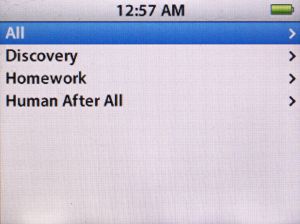
The iPod’s default behavior is to sort alphabetically.
Here’s Daft Punk’s albums:
Discovery (2001), Homework (1997) and Human After All (2005).
Not that long ago, I was asked by a commenter if I had any suggestions for getting the iPod to sort albums chronologically. By default, the iPod’s behavior is to sort albums alphabetically by title. In iTunes, there’s the option to sort “Album By Year” but the iPod features no such function.
At the time, I didn’t have much of an answer for him other than to put the albums in a playlist and just listen to the songs in chronological order. But in an interesting twist, the pixels in that reply were barely dry before Apple released version 1.3 of the firmware for 5G iPods. After some further discussion, this trick was discovered:
The most noticeable change in firmware 1.3 is the application of iTunes’ “smart sorting” (ignoring “a” “an” and “the”), including recognition of iTunes’ custom “Sort Fields” (Sort Album, Sort Composer), for Album and Composer. The Sort fields allow you to enter any text that you want and iTunes/iPod will use that to order the list of items, while displaying the text from the actual field.
Using the Sort Album field, you can easily put albums in whatever order you like. For example, you could put the Halo number of Nine Inch Nails releases in the Sort Album field to have all items, including singles and remix albums, displayed in the order they were released.
For basic chronological sorting, just put the year in the Sort Album field and voila, the iPod will show the album title, but they will be ordered by the year.
UPDATE: The previous version of this post recommended putting the year of the album in the Sort Album field. This, however, effectively changes the name of the album within iTunes’ logic, making it group all albums of the same year together.
The revised method is to simply prepend the year to the album name in the Sort Album field. This way, each album gets a unique identifier that still sorts by year.
Additional caveat: this tip has the potential (there have been mixed reports) to reorder the listings of the “Album” browser, as the Sort Album field may be applied to it. So if you ever use the iPod’s Album View, keep this in mind. See the discussion in the comments for effects and solutions.
For this demonstration, I’ve selected Daft Punk’s three studio albums:
- Homework (1997)
- Discovery (2001)
- Human After All (2005)
As you can see in the image at top, the default behavior is to display the albums in alphabetical order, with Discovery as the first. How do we fix that?
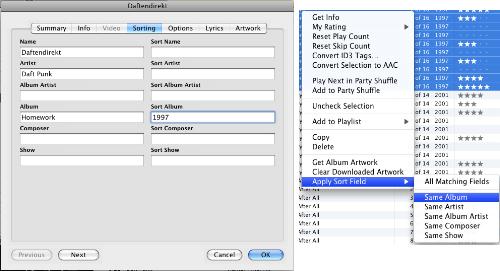
click to enlarge
- In iTunes, get info on the first song of the album.
- Click the Sorting tab.
- Enter the year of the album then the album name into Sort Album field
- Click OK.
- Select all the songs on the album
- Right-click/Control-click and select Apply Sort Field > Same Album
- Repeat for as many albums as you care to customize
When you next update your iPod, the new data will take effect and the albums will be sorted by release date.
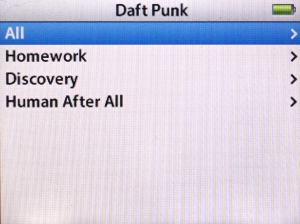
Daft Punk albums sorted chronologically.
This process works for any 5G iPod that has been updated to firmware version 1.3 (and I assume iPods/iPhones released subsequently) So if you haven’t updated yours, hop to it and then get customizing.
UPDATE 2: As mentioned in the comments, if you have an artist who released two or more albums in the same year, there are two options you can use to sort them appropriately:
- If you know the more specific album release date, you can prepend that to the album name.
Example: If one album was released in March and another in October, use 2008-03and 2008-10 . - If you don’t know the date, you can order them with a number.
Ex: 2008-1, 2008-2 and so on.
Thanks!!
Now just to sort Live, Studio & compilations together some how.. =)
Reply
This has totally goofed my albums (artist has more than one album in the same year). How do you undo it?
Reply
tunequest Reply:
June 21st, 2008 at 8:52 am
To undo it, simply repeat the above steps, but instead typing something into the Sort Album field, delete it.
If you know the order that the albums were released, you can always change the sort order to a more specific scheme:
Like a date: 2008-04 (for April 2008)
or release order: 2008-B (for the second album released that year)
etc
Reply
AJSJ Reply:
June 26th, 2008 at 7:46 pm
Thanks. That’s exactly what I did initially but, in iTunes and on my iPod, it did not completely ‘undo’ the resorting of the albums; albums (all in the same year) were not being grouped together both on my computer and iPod. After restarting iTunes and doing a soft reset on the iPod, however, the ‘undo’ was applied completely and everything was back to how it was before I tried to show the albums sorted by year.
Still not sure why the sorting didn’t work though. Would be interested in what anyone else finds – try applying the ‘sort’ as described above for multiple albums that came out in the same year by the same artist (e. g., Elton John’s Madman Across the Water and Tumbleweed Connection both came out in 1971; when I applied this they appeared in the entire album structure in the appropriate place by year but the songs from the two albums were mixed together – there were other examples as well).
Reply
beverly Reply:
March 12th, 2011 at 2:35 pm
I was sorting by year and in the “sort album” tab i put the year then the month of its release and it organized it for me.
For example, the beatles had the “magical mystery tour” and “Sgt. peppers” album released in 1967 soo in the the ‘sort album’ tab, for “Sgt. peppers” i typed in “1967 June” and for the other album i put “1967 November”. It worked for me
Reply
THX.5280 Reply:
May 13th, 2014 at 9:21 am
Probably because “J” is before “N” in the alphabet. I bet if you had “1967 November” and “1967 December”, the December album would appear first.
Reply
it didnt work for mine. mine is a 30gb video ipod. i tryed the above hint for all of H.I.Ms cds…
i put all of darklite at 2005
Venus Doom cd at 2007 etc etc
and it still shows up alphabedically.
is there anything im missing? i put it in the sort feild like u said, followed the steps and made sure everything for each cd matched….
if u could reply, thanx
Reply
tunequest Reply:
July 9th, 2008 at 8:24 am
Hi Jason. I can think of two things that might be wrong:
1) make sure you’ve applied the latest firmware update. It can be accessed from inside iTunes on the screen that appears after you plug in your iPod.
or
2) It should have done this automatically, but try erasing the songs from your library then re-adding them after you’ve made the change. Maybe the updates didn’t make it to the iPod for some reason.
If those two items don’t work, you may need to try a hard reset (wipe everything and start over). And if that doesn’t work, it could just be that the feature isn’t supported on your model iPod.
Good luck.
Reply
jason Reply:
July 9th, 2008 at 8:32 am
ok, my ipod is at 1.3 and just yesterday i updated Itunes to 7.6 (dont know ifthat matters or not)
and erm…ive got a lot of songs >.<…that could take quite a while to redue everything
and im not sure what u mean by the first thing but do u mean to just wipe the ipod clean and then just re-copy everything over to it?
and sicne i updated itunes ive not tried it yet…. but im guan do that in just a second i guess
Reply
jason Reply:
July 9th, 2008 at 8:47 am
can you type out what your ipod looks like? i mean, do u have anything in any of the other slots for organization? and are all ur files at the same ID tag? does that matter?
OGM!!! I THINK IT WORKED!!!!!!
YOUR THE BEST PERSON ON THIS ENTIRE FREAKIN PLANET!!!!!!!
it sorta worked, its jumbled but ill fix it!! UR THE BEST THANK YOU THANK YOU THANK YOU!!!!
Reply
jason Reply:
July 9th, 2008 at 9:13 am
THANK YOU THANK YOU THANK YOU THANK YOU THANK YOU THANK YOU THANK YOU!!!!! its all amazing
and it was just a few minor weird things i had to change! THANKS SO MUCH
Reply
MallMetalSucks Reply:
January 15th, 2009 at 7:59 am
I think the problem here is that you’re listening to HIM and your iPod is trying to teach you better taste.
Reply
[Shep] Reply:
March 29th, 2009 at 9:20 pm
LOL
Reply
What can I do if I have albums from different artists with the same name? For example, I have three different bands with “Live at the Fireside Bowl” and “MTV Unplugged” — how can I prevent them from all using the same year when sorting?
Reply
Can Özdilek Reply:
January 16th, 2012 at 9:16 am
I name the albums with brackets for that. Like:
A Girl like Me (Emma Bunton)
A Girl like Me (Rihanna)
and millions of “Greatest Hits” albums! =-)
Reply
Awesome tip. I can confirm it works perfectly on an iPhone 3G. Thanks so much!
Reply
Cool. I think I knew about this once but can’t remember if I got around to trying it or not.
My biggest issue with sorting right now is that albums with songs by mutiple artists get split when updating to the ipod (vers 1.3). In iTunes, I’ve edited the sort artist tag to display them correctly, but this doesn’t transfer to the ipod. Very annoying.
For example: A David Bowie best of containing ‘under pressure’ by David Bowie and Queen is tagged as David Bowie, but on the ipod it looks like this:
David Bowie
David Bowie and Queen
David Bowie
and don’t even get me started on Robbie Williams’ Swing when you’re winning.
Reply
Oscar Reply:
September 29th, 2008 at 3:51 pm
What I do to sort this out is that I put the second artist on the song name field instead of the artist field. For example, I would tag it like this:
Title: Under Pressure (ft. Queen)
Artist: David Bowie
Album: The Best of David Bowie
This leaves you only with one entry for David Bowie when you browse your iPod by Artist.
Also, I think your iPod looks like this:
David Bowie
David Bowie and Queen
David Bowie
because there is at least one song that has the artist name slightly different or is tagged differently than the others. For example a blank space after “Bowie”, or you have something on the “Artist Album” field. Make sure that all of them are tagged exactly the same and it should disappear.
Cheers!
Reply
This problem has annoyed me for ages, so thank for the solution. I have hundreds of albums with this problem, so I wrote the following VB script to sort the lot of them out at once. BTW it stopped working when I upgraded to Itunes 8 (Damn!):
Option Explicit
Dim iTunesApp ‘ iTunes.Application object
Dim tracks ‘ The tracks collection object of the Library object.
Dim numtracks
Dim ITTrackKindFile
Dim currTrack
Dim i
ITTrackKindFile = 1
Set iTunesApp = CreateObject(“iTunes.Application.1″)
Set tracks = iTunesApp.LibraryPlaylist.Tracks
numTracks = tracks.Count
FOR i = 1 TO numTracks step +1
SET currTrack = tracks.Item(i)
‘is this a file track?
IF currTrack.Kind =ITTrackKindFile THEN
IF currTrack.Year > 0 THEN
currTrack.SortAlbum = currTrack.Year & ” ” & currTrack.Album
END IF
END IF
NEXT
Hope this helps
Reply
LoLo Reply:
November 29th, 2008 at 10:38 pm
THAT SCRIPT IS F^CKIN AWSOME DUDE !!!!
IT WORKS GREAT ! YOU ROCK !
THANK YOU A THOUSAND TIMES !
Reply
This works greatly if you’re not going to browse your iPod by Album. When you go to Music -> Albums you will see that all of your albums will be sorted by year. When you have 1.500+ albums, like I do it’s very impractical and unless you know the release date of every single album you have it’s going to be very difficult to find. Unless, of course, that you never browse your iPod like this, which in case will work wonders for you.
Just my two cents.
Reply
adj Reply:
December 1st, 2008 at 3:34 pm
To be honest I’ve never found the Albums option very useful. I only have 638 albums but have just tried this on my iPod Classic 5G and all of the albums are in alphabetical order.
You could very easily do something like
currTrack.SortAlbum = currTrack.Artist & ” ” & currTrack.Year & ” ” & currTrack.Album
But that would affectively emulate the ‘By Artist’ option.
Reply
It doesn’t work on iPod classic. Well, it works, but it if you have the album corvers, the iPod mix a lot of covers… Any suggestion to fix this?
Reply
I have found this to be the perfect solution:
Under SORTING > SORT ALBUM enter ARTIST YEAR ALBUM
e.g.
Red Hot Chili Peppers 1999 Californication
Red Hot Chili Peppers 2002 By The Way
Red Hot Chili Peppers 2006 Stadium Arcadium
Led Zeppelin 1969 Led Zeppelin
Led Zeppelin 1969 Led Zeppelin II
Led Zeppelin 1970 Led Zeppelin III
Jefferson Airplane 1967 After Bathing At Baxter’s
Jefferson Airplane 1967 Surrealistic Pillow
Jefferson Airplane 1968 Crown Of Creation
This way none of your album covers will get ‘mixed up’ even for albums released in the same year by any particular artist.
I have sorted over 500 albums this way on my 160gb Classic. Works perfectly.
Reply
iTunes King Reply:
March 19th, 2009 at 2:24 pm
Yes, this is what I have been doing until I found out this also does not work correctly.
It may work nice when viewing albums in iTunes, but when you look at “albums” on your iPod, it lists those sorted albums under the letter/number that it is sorted with.
For instance, look under “albums” on your iPod and look for the album “Californication”. It should be under “C” but it is now under “R” since you sorted it by “Red Hot Chili Peppers 1999 Californication”.
Reply
Similarly, for compilations:
Various Artists 2002 The Family Values Tour 2001
Various Artists 2008 Indie/Rock Playlist: July (2008)
Various Artists 2008 Ministry Of Sound The Annual 2008
I have grouped movies, games and tv show soundtracks separately
Various Artists Motion Picture Soundtrack 2001 Blow
Various Artists Motion Picture Soundtrack 2006 Children Of Men
Various Artists Motion Picture Soundtrack 2007 Across The Universe
Various Artists Original Game Soundtrack 2005 Gran Turismo 4
Various Artists Soundtrack 2006 House MD
Reply
Guys, all you got to do is put ANY NUMBER into the ‘sort album field’! i.e Homework would be 1, Discovery 2, Human after all 3. This gets around the 2 albums in a year problem.
Tadah!
Reply
The number works better, I had it all scrambled with multiple albums in the same year. Cheers all for this.
Reply
But I still have a big problem!
I have sorted all beatles album like that :
1963 01 Please Please Me
1963 02 With The Beatles …..
when i go into artist, Beatles, No problem, they are sorted by year of release and no problem with two album on the same year because of the 01,02 …
BUT!!!
When i go into Album!
they are sorted by numbers !
for instance : please please me is not anymore at P but a # !!!
I want to have my album on their good letter and sorted by year of release when i go in artist!
So i have now all my albums in # ……
I have a iTouch 32Gb 2Gen lastest firmware (3.0) & iTunes 8.2.0.23 ….
So i want my album sorted by year of release when i’m into artist section but by Their names when I’m in Album Menu !!!
Thanks a lot
Reply
tunequest Reply:
July 9th, 2009 at 8:54 pm
Hi Fred, the Sort Album function is apparently global in nature. Changing the sort name seems to apply everywhere an album is listed. The iPod follows the same behavior whether you’re browsing Artists > Beatles > Albums or the full list of albums. Because of the way the software works, there’s no way to specify one type of sorting for one situation and a different type for another.
For me personally, it’s not a problem because I rarely if ever browse by album; I tend to browse by artist first. But I can see how this can be annoying for those who do like to look at the album list.
Reply
I have an 80 Gb iPod classic. On iTunes my albums are all in order but on my iPod, under cover flow, some get thrown out of sequence and put at the end of the list. Example, I have every Metallica album they made and for the most part they’re all in order. But at the end of the list Garage, Inc & Garage Days are appearing there instead of with the rest of the Metallica albums. Same thing with a few Alice In Chains, Iron Maiden, Anthrax, etc. It goes through A-Z, then starts back at A with the ones it kicked out, and puts those in alphabetical order. I’m at my wits end! Please help!
Reply
Nik Reply:
March 16th, 2010 at 2:10 pm
They are appearing at the end because you have them classed as ‘part of a compilation’.
I had the same problem, just select the albums tht appear where they shouldn’t and open the info box ‘ctrl+I’ make sure the ‘part of compilation’ in the options menu is set to no
Reply
Thank you so much! My albums are now in chronological order 😀
Reply
hi!
mh I am not using itune to synchronize my ipod, is this sort album field only accessible through itunes?
Reply
Hi, this looks good, although i have far too many albums to go through manually, isn’t there any way i can set this up manually?
Reply
This isn’t all that great but it is a solution if you search for music using the “artist” filter.
The problem is that the SORT name is what the iPod actually uses to sort the albums and the Album Name is what it DISPLAYS.
So effectively while the album’s name isn’t SHOWN as for example
2000 Swagger
2002 Drunken Lullabies
when you scroll through your music using the “Albums” filter, all the albums fall under the “1 2 3” category since the iPod recognizes it’s Sort name begins with a number.
I have no idea why they don’t have Album by Artist/Year sorting on the iPod too. It makes so much sense.
Reply
After I got a new iPod classic 160GB, I tried to make it sort the albums by year for two days. And since I have over 25000 songs, and accordingly a few thousand albums, this wasn’t a good solution for me, it would take me a few days to make it work like that (and I would have to do it again if I would reinstall iTunes/windows). In the end I decided to mimic my folder structure, and to add the year to the start of the album name.
Since going through the 25k songs would be too time consuming manually too, I wrote scripts for the tag editor “Mp3tag” v2.50. For these scripts to work, you need to have the entries for year and album in the tags. If the year is missing, it will leave the album name as it is, and it also won’t write if the year has some trash sequence as entry, which doesn’t start with 4 numbers.
To add the year to the Album name and making sure that the year tag actually consists out of at least 4 numbers (to not get a separating space at the start of the album if there is no year to be added, like it would have been with “%year% %album%” alone):
$if($and($and($isdigit($mid(%year%,1,1)),$isdigit($mid(%year%,2,1))),$and($isdigit($mid(%year%,3,1)),$isdigit($mid(%year%,4,1)))),%year% %album%,%album%)
And now since we won’t be using an iPod until we die, or in case apple finally fixes this design flaw, here is the revert script. It removes the first 5 signs of the album name in case the first 4 are numbers and the whole name is longer than 5 signs (the 4 signs for the year and the separating space). That way it for example won’t touch the Beatles’ singles collection “1” if there is no year attached to it. It also won’t touch an album called “1234”, and not even “12345”, or “1234a”, but if there is something like “123456”, you have a problem, I can’t think of any albums though that start with 4 numbers and are at least 6 signs long, so the risk should be minimal.
$if($and($and($and($isdigit($mid(%album%,1,1)),$isdigit($mid(%album%,2,1))),$and($isdigit($mid(%album%,3,1)),$isdigit($mid(%album%,4,1)))),$grtr($len(%album%),5)),$cutLeft(%album%,5),%album%)
Alternatively you could put some signs that would never be used in album names between the year and the actual album name, but imo it’s very disturbing to see “1965°^~¶☻▓ My Generation” and so…
Reply